English English ▼
  • English English
  • Hindi Hindi
  • Chinese (Simplified) Chinese (Simplified)
  • Chinese (Traditional) Chinese (Traditional)
  • Afrikaans Afrikaans
  • Albanian Albanian
  • Amharic Amharic
  • Arabic Arabic
  • Armenian Armenian
  • Azerbaijani Azerbaijani
  • Basque Basque
  • Belarusian Belarusian
  • Bengali Bengali
  • Bosnian Bosnian
  • Bulgarian Bulgarian
  • Catalan Catalan
  • Croatian Croatian
  • Czech Czech
  • Danish Danish
  • Dutch Dutch
  • Estonian Estonian
  • Filipino Filipino
  • Finnish Finnish
  • French French
  • Georgian Georgian
  • German German
  • Greek Greek
  • Gujarati Gujarati
  • Haitian Creole Haitian Creole
  • Hebrew Hebrew
  • Hungarian Hungarian
  • Icelandic Icelandic
  • Indonesian Indonesian
  • Irish Irish
  • Italian Italian
  • Japanese Japanese
  • Javanese Javanese
  • Kannada Kannada
  • Kazakh Kazakh
  • Khmer Khmer
  • Korean Korean
  • Kurdish Kurdish
  • Kyrgyz Kyrgyz
  • Lao Lao
  • Latin Latin
  • Latvian Latvian
  • Lithuanian Lithuanian
  • Luxembourgish Luxembourgish
  • Macedonian Macedonian
  • Malagasy Malagasy
  • Malay Malay
  • Malayalam Malayalam
  • Maltese Maltese
  • Maori Maori
  • Marathi Marathi
  • Mongolian Mongolian
  • Myanmar (Burmese) Burmese
  • Nepali Nepali
  • Norwegian Norwegian
  • Pashto Pashto
  • Persian Persian
  • Polish Polish
  • Portuguese Portuguese
  • Punjabi Punjabi
  • Romanian Romanian
  • Russian Russian
  • Samoan Samoan
  • Serbian Serbian
  • Sesotho Sesotho
  • Shona Shona
  • Sindhi Sindhi
  • Sinhala Sinhala
  • Slovak Slovak
  • Slovenian Slovenian
  • Somali Somali
  • Spanish Spanish
  • Sundanese Sundanese
  • Swahili Swahili
  • Swedish Swedish
  • Tajik Tajik
  • Tamil Tamil
  • Telugu Telugu
  • Thai Thai
  • Turkish Turkish
  • Ukrainian Ukrainian
  • Urdu Urdu
  • Uzbek Uzbek
  • Vietnamese Vietnamese
  • Welsh Welsh
  • Xhosa Xhosa
  • Yiddish Yiddish
  • Yoruba Yoruba
  • Zulu Zulu

Author name: Aegis Xntel

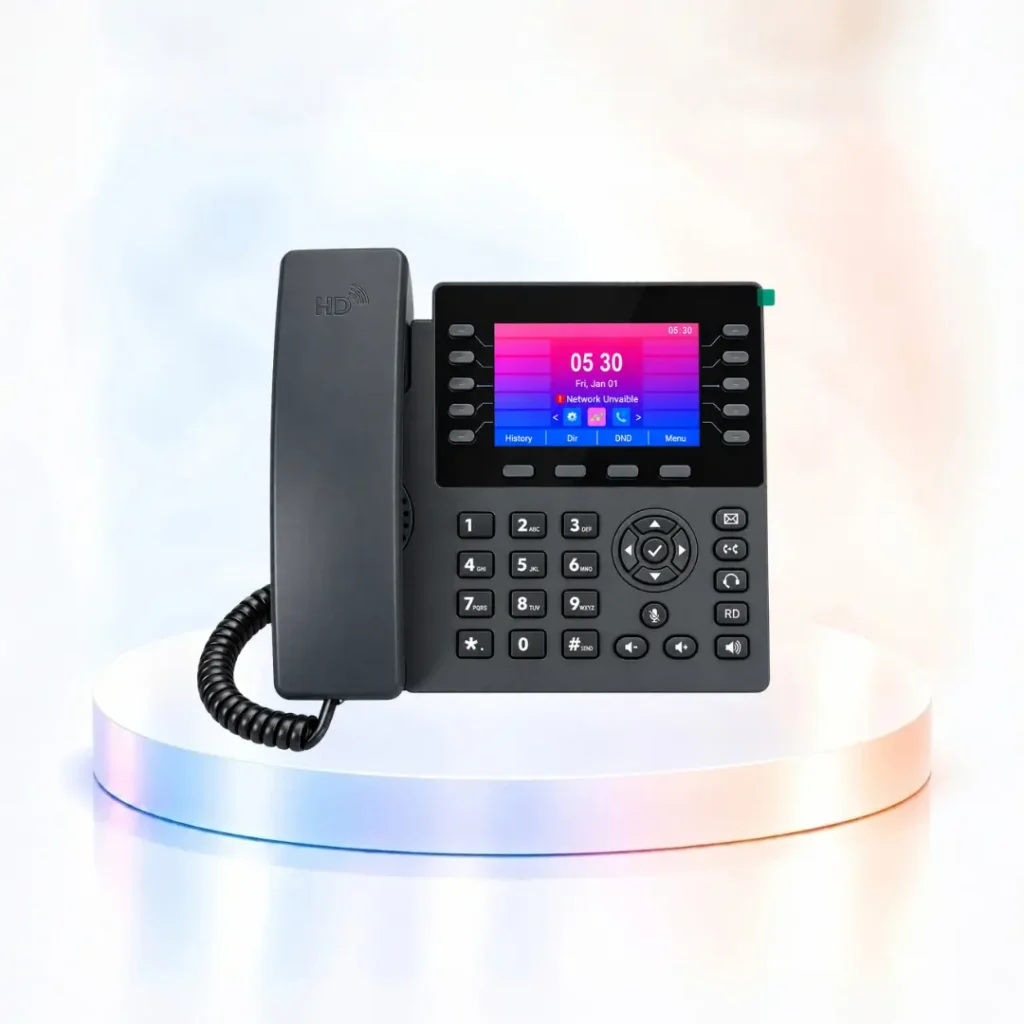
AEGIS XNTEL XN107 IP Phone for business VoIP communication
IP Phones

Best IP Phones for Business in India: Complete VoIP & SIP Phone Guide

AEGIS | XNTEL™ · IP Phone Buying Guide Best IP Phones for Business in India: Complete VoIP & SIP Phone Guide Looking for a reliable business IP phone? Learn how VoIP phones, SIP IP phones and WiFi IP phones work, which features matter, and how to select the right desk phone for your office. Explore IP Phone Solutions Request Product Details Introduction Why IP Phone Solutions Matter for Modern Business Communication Whether you manage a growing office, customer service desk or enterprise reception area, a well-chosen IP phone can make daily calling easier to manage. Business communication increasingly relies on IP networks instead of traditional telephone lines. A business IP phone uses network connectivity and supported telephony services to make and receive calls. Companies can connect compatible desk phones with an IP-PBX or hosted VoIP platform for extension-based communication and flexible call management. AEGIS | XNTEL™ provides IP Phone Solutions for office desks, reception teams and enterprise environments, including wired SIP IP phones, WiFi IP Phone options and DSS expansion consoles. IP Telephony Basics What Is an IP Phone, VoIP Phone and SIP IP Phone? An IP Phone is a telephone that communicates over an Internet Protocol network. A VoIP Phone uses Voice over Internet Protocol technology to carry voice communication through suitable data networks. A SIP IP Phone uses Session Initiation Protocol for call setup and control with compatible SIP services or phone systems. These terms often overlap in business use. When choosing an IP Phone, compare SIP accounts, audio codecs, network interfaces and IP-PBX compatibility. Core Features Key Features to Look for in Business IP Phones 01 · Audio HD Voice Quality Clear audio can make customer calls and internal conversations easier. HD voice and codec support depend on the model. 02 · SIP SIP-Based Communication Compatible SIP devices can register with supported IP-PBX or hosted telephony platforms. 03 · Accounts Multiple SIP Accounts Selected models support multiple SIP accounts or lines for different business calling requirements. 04 · Calling Call Management Depending on the device and service, supported functions may include hold, transfer, forwarding and conferencing. 05 · Network Ethernet & WiFi Choose wired networking or a supported WiFi IP Phone model according to your office infrastructure. 06 · Integration IP-PBX Compatibility Connect compatible IP Phones to an office IP-PBX or Unified Communications environment. How It Works How Does an IP Phone Work in an Office? 01 Connect to the Network Connect the phone using Ethernet or supported WiFi connectivity. Some models provide Power over Ethernet support. 02 Configure SIP Account Register the compatible IP Phone with your IP-PBX or hosted telephony service. 03 Assign Extension Configure user details, extension numbers and available calling permissions. 04 Start Business Calling Make and receive calls through the configured telephone system and network connection. Technology Comparison IP Phone vs Analog Phone: What Is the Difference? Feature IP Phone Analog Phone Connection Compatible IP network Analog telephone connection Technology Commonly SIP / VoIP Traditional analog telephony Extensions IP-PBX or VoIP platform Analog-compatible PBX Audio HD audio on supported devices Depends on line and device Features Multi-line, conference, BLF and more Depends on PBX and model Suitable For IP-based business communication Existing analog infrastructure Connectivity Options WiFi IP Phone vs Wired SIP IP Phone WiFi IP Phone A WiFi IP Phone can be useful when suitable wireless coverage is available and installing Ethernet cables is inconvenient. Check WiFi bands, signal strength, device power requirements and compatibility before deployment. Wired SIP IP Phone Wired IP Phones are useful for fixed office workstations with available Ethernet connectivity. Supported PoE devices may simplify power cabling and installation. AEGIS | XNTEL™ Product Range Explore AEGIS XNTEL Business IP Phone Models AEGIS XNTEL offers several IP Phone models for different business communication requirements. Compare specifications, connectivity and calling features before selecting a device. XN101W WiFi Phone A WiFi IP Phone option for compatible wireless office communication. XN101 IP Phone Explore this SIP desk phone for everyday office calling. XN102 IP Phone Review available SIP, audio and networking features. XN103 IP Phone Compare call management and device specifications. XNP11W WiFi Executive IP Phone Explore a wireless executive desk phone for compatible office setups. XN104 IP Phone Review SIP calling capabilities, connectivity and available functions. XN104W IP Phone Explore supported WiFi options and professional calling features. XN105 IP Phone Compare account support, display and connectivity. XN106 IP Phone Review suitable business telephony features. XN107 IP Phone Explore its color display, multiple SIP account support and advanced desktop calling options. Explore XN107 Specifications For reception desks and high-volume communication teams, also explore compatible DSS expansion consoles. View All IP Phone Models IP Phone Buying Guide How to Choose the Best IP Phone for Your Business The best IP Phone is the one that matches your office communication requirements. User role: Reception, sales, management or support Connectivity: Ethernet, PoE or WiFi SIP capacity: Accounts and line requirements Audio: HD codecs, headset and speakerphone Features: Transfer, hold and conference calling Compatibility: Existing IP-PBX or SIP platform Scalability: Future business expansion Support: Installation and configuration requirements Business Applications Where Enterprise IP Phones Add Value Corporate Offices Support internal extension calling and office communication. Reception Desks Help reception teams manage incoming calls and transfers. Sales & Support Support customer conversations with compatible call controls. Hotels & Hospitality Explore IP Phone options for front desks and administration. Healthcare Offices Support communication between administrative departments. Multi-Branch Businesses Deploy compatible SIP extensions across connected office locations. Frequently Asked Questions IP Phone, SIP Phone & VoIP Phone FAQs What is an IP Phone used for? An IP Phone is used for voice calling over compatible IP networks, often through an IP-PBX or hosted VoIP platform. Are IP Phones and VoIP Phones the same? The terms often refer to similar devices. IP Phone refers to network connectivity, while VoIP describes voice over IP technology. What is a SIP IP Phone? A SIP IP Phone uses Session Initiation Protocol to communicate with compatible SIP services and phone systems. Can
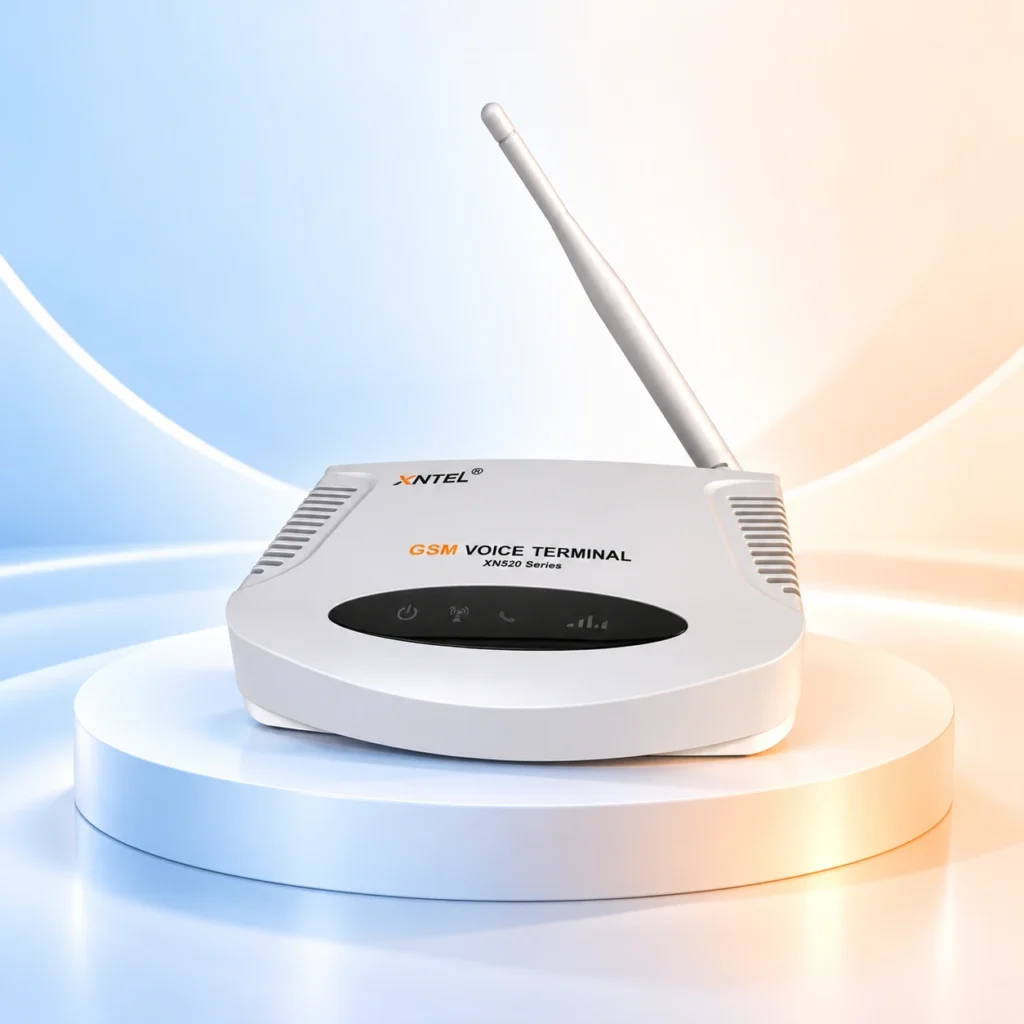
GSM Voice Terminal

GSM Voice Terminal: Smart Business Communication Solutions

AEGIS | XNTEL™ • Telecom Solutions GSM Voice Terminal: Smarter Connectivity for Modern Businesses Connect business communication systems with compatible cellular networks through AEGIS XNTEL GSM Voice Terminal solutions. Explore reliable SIM-based calling, flexible connectivity and advanced features on supported models. Explore GSM Solutions Request a Consultation Introduction Why Modern Businesses Need Flexible Communication Solutions Business communication depends on accessible, reliable calling infrastructure. A GSM Voice Terminal helps compatible telephone equipment communicate through supported mobile networks. Organizations use telephone systems to manage customer enquiries, coordinate operations, connect branch offices and deliver services. Traditional fixed-line connectivity may not be suitable for every deployment. AEGIS | XNTEL™ GSM Voice Terminal solutions offer SIM-based connectivity options for compatible telephones, PBX systems and other supported telecommunications equipment. Technology Explained What Is a GSM Voice Terminal? A GSM Voice Terminal, also called a Fixed Wireless Terminal or Fixed Cellular Terminal, is a device designed to connect compatible telephone equipment with a supported cellular voice network. Depending on its interfaces, the terminal can connect to an analog telephone or PBX/EPABX, allowing calls to be made or received using a suitable SIM card. The AEGIS XNTEL range includes multiple configurations for different network technologies, port capacities and operational requirements. Business Benefits Key Advantages of GSM Voice Terminal 01 SIM-Based Calling Enable compatible telephone devices to use a supported cellular voice connection. 02 PBX Integration Selected terminals support connections with compatible PBX and EPABX equipment. 03 Flexible Deployment Consider cellular connectivity for offices, branch locations and temporary workspaces. 04 Multiple Model Options Choose a configuration based on network, port count and installation needs. 05 Call Management Advanced variants may offer call recording, click-to-call and other management features. 06 Operational Convenience Integrate supported calling functions within a business communication workflow. Connectivity Workflow How Does a GSM Voice Terminal Work? STEP 01 Insert SIM Install a supported SIM card according to the device instructions. STEP 02 Connect Device Connect compatible telephone or PBX equipment using supported interfaces. STEP 03 Configure Configure calling, network and other available settings for the selected model. STEP 04 Start Calling Make or receive calls through the configured cellular network connection. Advanced Communication Features More Than Basic Cellular Calling Selected AEGIS XNTEL Advance and Turbo configurations offer additional functions to support business communication. Auto Dialer Support configured outbound calling workflows where available. Voice Broadcasting Deliver prerecorded voice messages through supported campaign features. Call Recording Capture conversations with recording capabilities on supported models. Click-to-Call Initiate calls from a supported software interface. IVR Call Routing Route callers through configured menu options when supported. Welcome Messages Introduce automated greetings into supported calling workflows. Features depend on model, firmware, software and deployment configuration. AEGIS XNTEL Product Range Explore GSM Voice Terminal Models AEGIS XNTEL offers several GSM Voice Terminal configurations to match different connectivity and business requirements. 2G GSM Voice Terminal Explore cellular voice connectivity for environments with suitable supported network availability. 4G GSM Voice Terminal Explore compatible 4G and VoLTE calling solutions. 4-Port 4G Terminal Explore multi-port cellular communication configurations. 8-Port 4G Terminal Consider higher-port configurations for suitable communication workloads. GSM Advance Explore additional calling and workflow functions on Advance models. GSM Turbo Explore advanced call management, auto dialer and broadcasting capabilities where supported. Additional variants include WhatsApp Integration and IVR System offerings. Confirm the exact specifications before purchase. View GSM Voice Terminal Range Industry Applications Where GSM Voice Terminals Can Be Used Call Centers Support compatible voice connectivity and selected outbound calling workflows. Banking & Finance Support business telephone communication and configured call management needs. Insurance Help teams coordinate customer communication and supported campaigns. Travel & Hospitality Support customer enquiries, booking communications and service coordination. Corporate Offices Add suitable cellular voice connectivity to compatible systems. Branch Locations Explore communication options for distributed business operations. Buying Guide How to Choose the Right GSM Voice Terminal Start by evaluating your current telephone infrastructure, expected call traffic, cellular network availability and desired business calling features. Important Selection Factors 2G, 4G and VoLTE network compatibility Number and type of supported ports PBX and telephone compatibility Required call recording functions Auto Dialer and IVR requirements Installation and power requirements Software and support availability Selecting a device with compatible interfaces and appropriate functionality helps create a more practical communication setup. Always verify specifications with the AEGIS XNTEL team. Frequently Asked Questions GSM Voice Terminal FAQs What is a GSM Voice Terminal? A GSM Voice Terminal connects compatible telephone equipment to supported cellular voice networks using a suitable SIM card. Can a GSM Voice Terminal connect to a PBX? Selected models support compatible PBX and EPABX connections. The required interface depends on the equipment. Does a GSM Voice Terminal support 4G? AEGIS XNTEL offers 4G models. Check model-specific VoLTE support and operator compatibility. Is call recording available? Call recording is available on selected models or compatible configurations. Verify the feature before purchase. What is the difference between Advance and Turbo? Both are feature-oriented product ranges. Exact calling functions, software capabilities and interfaces depend on the chosen model. Which GSM Voice Terminal is suitable for business? The suitable model depends on network coverage, telephone compatibility, port count and required calling features. Conclusion Build a More Connected Business A GSM Voice Terminal can be a valuable part of a business communication system when the available cellular network, telephone equipment and device interfaces are compatible. With options ranging from basic connectivity to advanced call management, AEGIS | XNTEL™ offers solutions for different deployment requirements. Explore the available models and choose a suitable configuration for your business communication environment. AEGIS | XNTEL™ Ready to Upgrade Your Business Calling? Discover GSM Voice Terminal solutions designed for modern business communication. Explore GSM Solutions Contact Our Team Empowering Communication. Transforming Business.

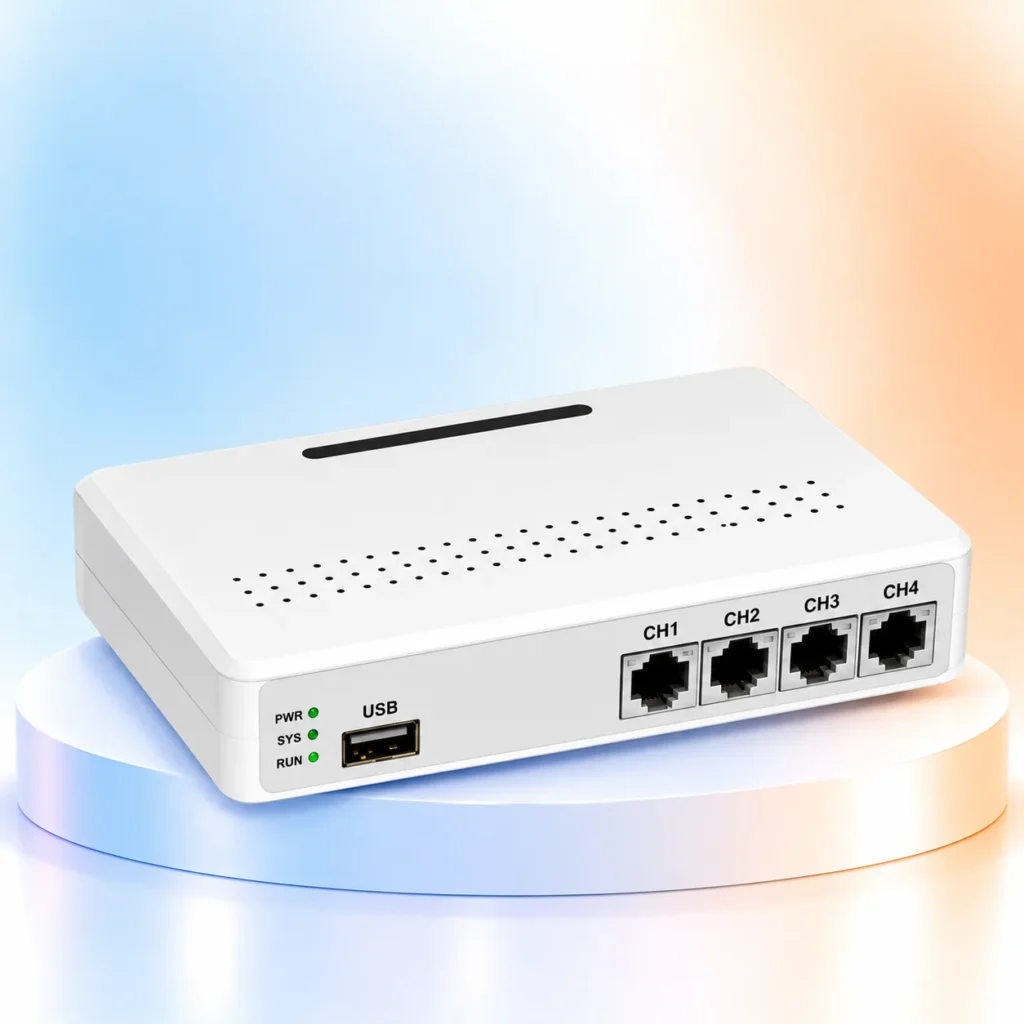
04 Line USB Voice Logger
Voice Logger

Voice Logger: Smart Call Recording Solution for Modern Businesses

AEGIS | XNTEL™ • Business Communication Smart Call Recording Solution: Voice Logger for Businesses Smart Call Recording Solution by AEGIS | XNTEL™ helps businesses record, organize and retrieve important telephone conversations. Discover practical Voice Logger technology for clearer communication records and more informed customer service reviews. Explore Voice Logger Solutions Introduction Why Businesses Need a Smart Call Recording Solution A Smart Call Recording Solution helps businesses capture and organize important telephone conversations for future review. In today’s fast-moving business environment, customer calls can contain valuable instructions, service requests and commitments. A professional Voice Logger gives authorized teams a structured way to reference these communications. Whether you operate a call center, financial institution, stock broking company or corporate office, maintaining organized communication records can improve visibility and accountability. AEGIS | XNTEL™ offers Voice Logger systems for different business environments. Selecting the right model depends on your telephone lines, connection type, storage requirements and recording workflow. Understanding Technology What Is a Voice Logger and How Does Smart Call Recording Work? A Voice Logger is a call recording system used to capture and store telephone conversations for future reference. Depending on the model and configuration, recordings can be managed and retrieved through supported software interfaces. These systems can support customer service reviews, internal training, dispute resolution and operational documentation. Business Advantages 7 Key Benefits of a Voice Logger System 01 Automatic Call Recording Capture supported telephone conversations without relying on manual recording. 02 Call History Management Maintain organized records that can help teams locate previous interactions. 03 Quality Assurance Review customer conversations for employee training and service improvement. 04 Conversation Verification Refer to recorded conversations when verifying customer instructions and business discussions. More Business Benefits Additional Advantages of Organized Call Records 05 Faster Follow-ups Refer to earlier calls when following up on customer questions, subject to authorized access and applicable privacy requirements. 06 Team Coaching Use appropriate call samples to help agents understand communication practices and improve customer interactions. 07 Better Documentation Maintain a consistent reference for discussions that may need review during business operations. Recording Workflow How a Smart Call Recording Solution Works A compatible telephone connection is connected to the recording system. The configured Voice Logger captures supported conversations. Recordings are saved to the configured storage system. Authorized users can access recordings through supported management software. AEGIS XNTEL Product Range Explore AEGIS XNTEL Voice Logger Products Different communication infrastructures require different recording solutions. AEGIS XNTEL offers multiple Voice Logger categories for various deployment needs. USB Voice Logger Explore USB-based recording solutions for compatible telephone installations. PCI Voice Logger Explore PC-based hardware recording configurations. Standalone Voice Logger Explore dedicated recording devices for independent deployment. PRI Voice Logger Explore compatible recording solutions for PRI-based communication environments. View All Voice Logger Products Industry Applications Where Voice Logger Solutions Add Value Stock Broking Maintain records of relevant customer discussions and trade-related instructions, supporting internal verification. Call Centers Review agent interactions, assist employee training and support service quality. Financial Services Improve the traceability of important telephone communications. Corporate Enterprises Create a more organized record of customer and business communications. Recording, retention and access controls should be configured according to applicable privacy and regulatory requirements. Buying Guide How to Choose the Best Voice Logger for Your Business Before selecting a Smart Call Recording Solution, evaluate the number of telephone lines, analog or digital infrastructure, storage capacity, recording retrieval needs and deployment environment. Ask whether your chosen model supports the connection type and workflow you actually use. Confirm device compatibility and supported features with the AEGIS XNTEL team before finalizing a model. Common Questions Smart Call Recording Solution: Frequently Asked Questions What is a Voice Logger used for? A Voice Logger records telephone conversations for review, verification, quality assurance and business recordkeeping. Is Voice Logger useful for stock brokers? Yes. Call recording systems can help stock broking businesses maintain records of important client communications, subject to applicable requirements. What types of Voice Logger are available? AEGIS XNTEL lists USB, PCI, Standalone and PRI Voice Logger solutions. Can Voice Logger recordings be accessed later? Supported recording systems allow authorized users to retrieve stored conversations. Search features depend on the specific model and software configuration. How do I choose a Smart Call Recording Solution? Start with your number of telephone lines, existing telephone system, recording needs, storage expectations and authorized access requirements. Confirm the exact features and compatibility of the proposed model before purchase. Can a Voice Logger support call center quality reviews? Yes. Where recording is permitted and appropriately configured, supervisors can review relevant calls for service quality and coaching. Access and retention should follow applicable requirements. AEGIS | XNTEL™ Make Every Conversation Count. Explore a reliable Smart Call Recording Solution for your communication infrastructure. Compare AEGIS XNTEL Voice Logger options and choose a configuration that fits your business needs. Explore Our Solutions Empowering Communication. Transforming Business.

Scroll to Top